Advances in Web typography
If you’re running a WebKit nightly, your browser supports two new ways of specifying custom fonts.
CSS2 ‘WebFonts’
With WebFonts you can define custom font faces by passing a URL to the font file:
@font-face { font-family: 'Bitstream Vera Sans'; src: url('http://www.freedesktop.org/~alp/tmp/Vera.ttf') format(truetype); } h1 { font-family: 'Bitstream Vera Sans', sans-serif; } |
The font gets downloaded and used without installation. A List Apart has some fancy CSS Zen Garden examples showing off the feature:
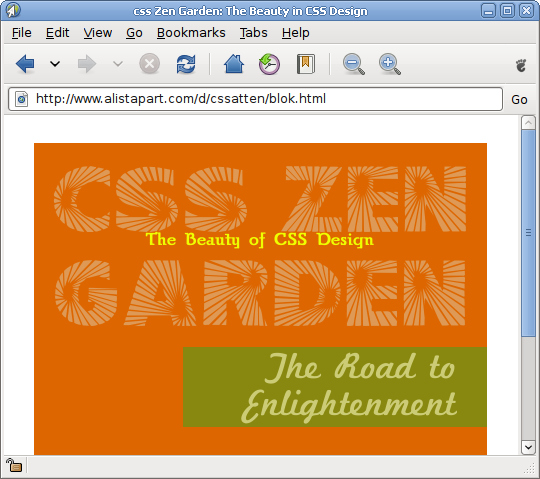
Now that the WIP Acid3 test requires TrueType/@font-face support, I expect other browser engines will be quick to join Opera and WebKit in implementing this.
SVG fonts
Then there’s the recently added support for SVG fonts.
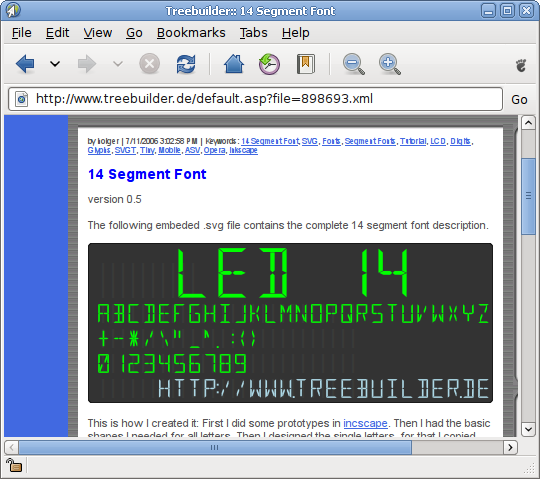
When #16880 lands, it’ll be possible to use SVG fonts not only in SVG content, but also as a standard WebFont format with @font-face:
@font-face { font-family: 'SVGraffiti'; font-weight: normal; font-style: italic; src: url("SVGraffiti.svg") format(svg); } |
This is still under development but works remarkably well. Nice work, Nikolas!
SVG font backend for Cairo
SVG fonts aren’t just for the Web — work is under way to make it possible to use them throughout the desktop with the experimental SVG font backend for Cairo. More on this coming very soon.
Checking it out
Building WebKit/GTK+ is now easier with the newly introduced autotools build system. Try the build instructions on GNOME Live! or just use jhbuild (module ‘WebKit’).

i never thought i would say this but thank you god someone finally autotoolized webkit … no more trying to figure out what script in WebKitTools/Scripts does what and which options it takes, yay! maybe now i will get off my duff and start sending patches for webkitgtk =)
Excellent, SVG Font support is something I’ve wanted for a while.
Is WebKit the first major engine to support this?
I don’t get the format(…) parameter — surely you can just look at the MIME-type to determine the format?
~Grauw
So basically we’d better start auditing freetype for security problems.
[…] no? Oggi Alp Toker ci da notizia che il supporto ai WebFonts, a quanto pare già presente in Opera, è stato integrato […]
@Alex: No.
Adobe SVG Viewer 3.0+ supports SVG fonts (2001)
Opera has supported SVG fonts since 8.5 (2005)
Batik 1.7 supports SVG fonts
Renesis 0.7 supports SVG fonts
Only major SVG implementation missing SVG fonts now is Firefox 3-
Great work WebKit/KDE team!
robert: my thoughts exactly.
Also, has anyone considers what happens if I create a page that specifies several thousand very small font files?
Or one *really big* one (for people on modems, or with bandwidth caps)?
robert: People routinely download fonts off the Web and install them system-wide without raising security concerns. The approach taken in WebKit is in fact more conservative (fonts get loaded in-process and aren’t installed to the system) — just like PDF viewers xpdf and Evince. But even then, you’re right of course, we always need to stay vigilant.
Adam Williamson: Since the fonts are loaded in-process, the threat of thousands of font files is no different than the threat of, say, thousands of img tags in a page. There are sanity checks in place to avoid this becoming a problem.
Holy cow! I just tried this out and it flies! I don’t know how Firefox 3 fell so far behind on both features and performance, I thought they had lots of good developers
[…] a Alp Toker che ha oggi ci ha rallegrato con questa notizia e Pollycoke che ha diffuso la […]
@Jeff Schiller
Thanks, I never knew Opera supported it (nor the Adobe SVG viewer), great work on their behalf.
@Alex: Opera supports a large amount of SVG, almost all of it in fact. ASVG however does not support SVG, it supports a subset of modern SVG but with a large number of non-standard properties. In fairness that is because ASVG was developed a long time ago prior to more complete definitions of the SVG spec. It no longer matters anyway as Adobe has discontinued it. And i believe Batik and Renesis are purely SVG viewers, eg no (or minimal) web proper.
Does WebKit support disabling this feature, forcing pages to use standard fonts instead?
Anonymous: Good idea. I guess we should make sure that it’s:
a) Possible to disable auto-download of custom fonts, just like you can already disable image download.
b) Possible to revert custom fonts after a page has loaded, in case the fonts are difficult to read.
I’ll look into getting these features added and supported in the SDK. Thanks!
As far as I know Opera has no @font-face support. I don’t know where you read about it.
sentio: The List Apart @font-face advocacy article is written by Opera Software CTO Håkon Wium Lie so it seems fair to assume that their browser supports it 🙂